
For construction firms
CIS deductions and job costs, checked before anything is paid.
If subcontractor admin means invoices keyed into a spreadsheet, deductions worked out by hand and job costs updated separately, this is the workflow we’d start from. Below is a demonstration built on synthetic data, so you can see the checks, the output and where a person signs off.
Why this process matters
Control invoice checks without duplicating manual work
Subcontractor invoice administration can involve repeated entry, labour and materials splits, deduction calculations and separate job-cost records. Automation can prepare checks and summaries while leaving decisions with the responsible person.
The review output should identify each invoice, the relevant deduction, net payment, job-cost position and exceptions, with a record of approval or decline.
Checks worth building into the process
- Keep labour and materials separate when calculating deductions using rates on file.
- Detect previously processed invoice identifiers.
- Roll up invoice totals against the relevant job budget.
- Require explicit approval before updating deduction and job-cost logs.
These are examples of how Bluequill approaches repetitive finance administration. We work across sectors; the right workflow depends on your systems and controls.
How the workflow runs
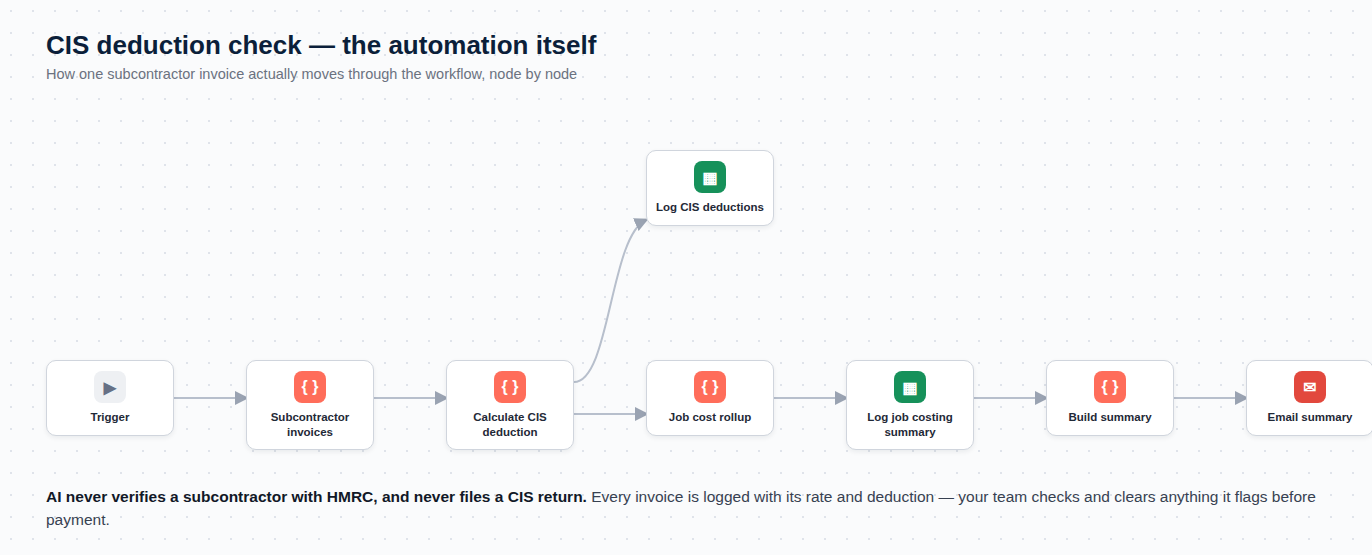
Riverside Office Refit: four subcontractor invoices
A fictional job (RJ-2026-014, budget £85,000) with four fictional subcontractors, run through a workflow Bluequill has built in n8n.
Invoice by invoice
Each invoice is keyed in, split into labour and materials, the deduction worked out at the rate on file, and the job’s running cost updated in a separate sheet. Two places to make the same mistake.
The checks
- Deduction applied to labour only, at the rate on file: 20%, 30% or 0%
- Duplicate guard: an invoice already logged is skipped
- Cost to date rolled up against the job budget
- Any subcontractor not marked as verified is flagged
A summary for the job
An email showing each invoice, the deduction, the net payment and the job’s position: £34,000 of £85,000 used (40.0%), £5,040 deducted, one invoice flagged.
Approve or decline
The email has Approve and Decline buttons. Only approved rows are written to the deductions log and the job costing summary. Declined ones go to a “needs review” tab with nothing changed.
| Invoice | Subcontractor | Status on file · rate | Labour | Materials | Invoice total | Deducted | Net payment | Check |
|---|---|---|---|---|---|---|---|---|
| INV-0142 | Mercer Electrical LtdElectrical | Verified · 20% | £6,000 | £2,000 | £8,000 | £1,200 | £6,800 | Clear |
| INV-0143 | Doyle GroundworksGroundworks | Unverified · 30% | £10,000 | £4,000 | £14,000 | £3,000 | £11,000 | Flagged: unverified |
| INV-0144 | Alder Plumbing & HeatingPlumbing | Gross · 0% | £5,500 | £1,500 | £7,000 | £0 | £7,000 | Clear |
| INV-0145 | Finch Roofing CoRoofing | Verified · 20% | £4,200 | £800 | £5,000 | £840 | £4,160 | Clear |
The deduction applies to the labour element only. Net payment is the invoice total less the deduction.
What it doesn’t do
It doesn’t submit returns, check anyone’s status, or replace your own or your accountant’s review. It works from the status and rate already on file, and the figures still need checking against payment records before they’re used.
What we’re not claiming
This is a demonstration, not a client result. We haven’t yet measured time saved or accuracy on a real job, so we don’t quote either. In your business it would be scoped to how your invoices actually arrive and where your job costs actually live.
Want to look at how your invoices are handled?
Book a free 20-minute call, or describe the task in a few sentences and get an initial view by email.
20 minutes, free, no preparation needed.
Prefer email? [email protected]