
For recruitment agencies
Recruitment agency pay-rate and margin check automation.
Check agreed pay rates, charge rates, recorded deductions and placement margins against your existing records. This demonstration flags discrepancies for human review; it does not run payroll or create invoices.
Why this process matters
Catch discrepancies before they become recurring problems
Weekly recruitment finance work often involves comparing agreed placement terms, approved hours, payment records and client invoices. Discrepancies can persist when those records are held in separate systems.
An effective exception report identifies the placement, expected value, recorded value, difference and rule applied. A person then checks the underlying records and decides whether a correction is required.
Checks worth building into the process
- Compare agreed pay rates with recorded payments and agreed charge rates with invoiced amounts.
- Check documented on-costs or deductions against the records held on file.
- Flag placement margins below the agency’s own threshold.
- Present exceptions for review; do not alter payroll or invoices automatically.
These are examples of how Bluequill approaches repetitive finance administration. We work across sectors; the right workflow depends on your systems and controls.
How the workflow runs
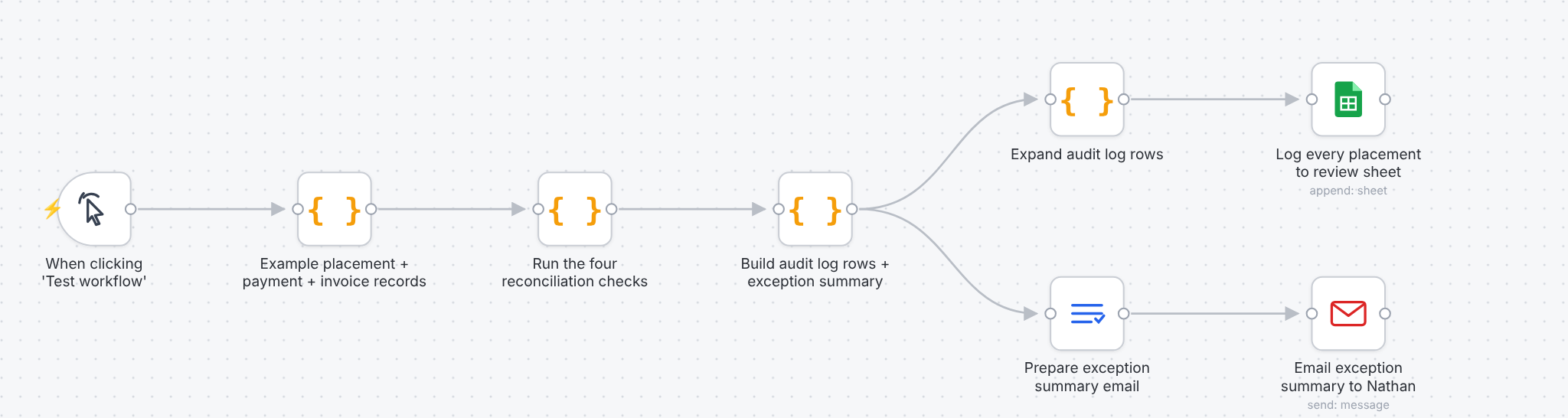
Seven fictional placements, three pay routes
A workflow Bluequill has built in n8n and run on synthetic data: fictional placements, workers and clients. We haven’t run it inside an agency, so treat it as a starting point for a conversation about your process, not a proven result.
Placement by placement
Approved hours go into payroll and onto the client invoice. Then someone compares each placement’s agreed pay and charge rates with what was actually paid and invoiced, works out the on-costs, and checks what’s left as margin. Every week.
Four checks
- Pay rate — paid against agreed
- Charge rate — invoiced against agreed
- Cost — employer NI and pension for PAYE, the umbrella fee, and the CIS deduction at the rate on file
- Margin — what’s left per hour against your minimum
Exceptions, with the numbers
7 placements checked: 3 clear, 5 exceptions across 4 placements — each one stating what was expected and what was found.
One email, your decision
Every placement is logged to a sheet, and the exceptions arrive in a single email for someone to review. The workflow changes nothing in payroll or invoicing — corrections are made by your team, in your systems.
| Placement | Pay route | Client | Result |
|---|---|---|---|
| PL-1001 | PAYE | Harrow Fit-Out Ltd | Clear |
| PL-1002 | PAYE | Harrow Fit-Out Ltd | Exception Pay rate: £17.50 paid against £19.00 agreed |
| PL-2001 | Umbrella | Dorchester Vets Group | Clear |
| PL-2002 | Umbrella | Dorchester Vets Group | Exception Charge rate: £27.50 invoiced against £29.00 agreed Exception Margin: £6.50 an hour against a £7.00 minimum |
| PL-2003 | Umbrella | Stour Valley Landscaping | Exception Margin: £4.50 an hour against a £5.50 minimum |
| PL-3001 | CIS | Lindford Joinery | Clear |
| PL-3002 | CIS | Lindford Joinery | Exception Deduction: £182.40 recorded against £273.60 expected at the rate on file |
One mistake can trigger more than one exception: in PL-2002 the lower charge rate is also what pushes the margin under the minimum.
What it doesn’t do
It doesn’t decide anyone’s employment status, run payroll, pay umbrella companies, file returns or verify subcontractors. It checks the figures you already hold against the rates you already agreed.
What we’d need to know
Where your agreed rates live, how payment records and invoices come out of your systems, and how often you’d want the check to run. That’s what the first call is for — no records or figures needed.
Want to talk through how your rates are checked today?
Book a free 20-minute call, or describe the task in a few sentences and get an initial view by email.
20 minutes, free, no preparation needed.
Prefer email? [email protected]